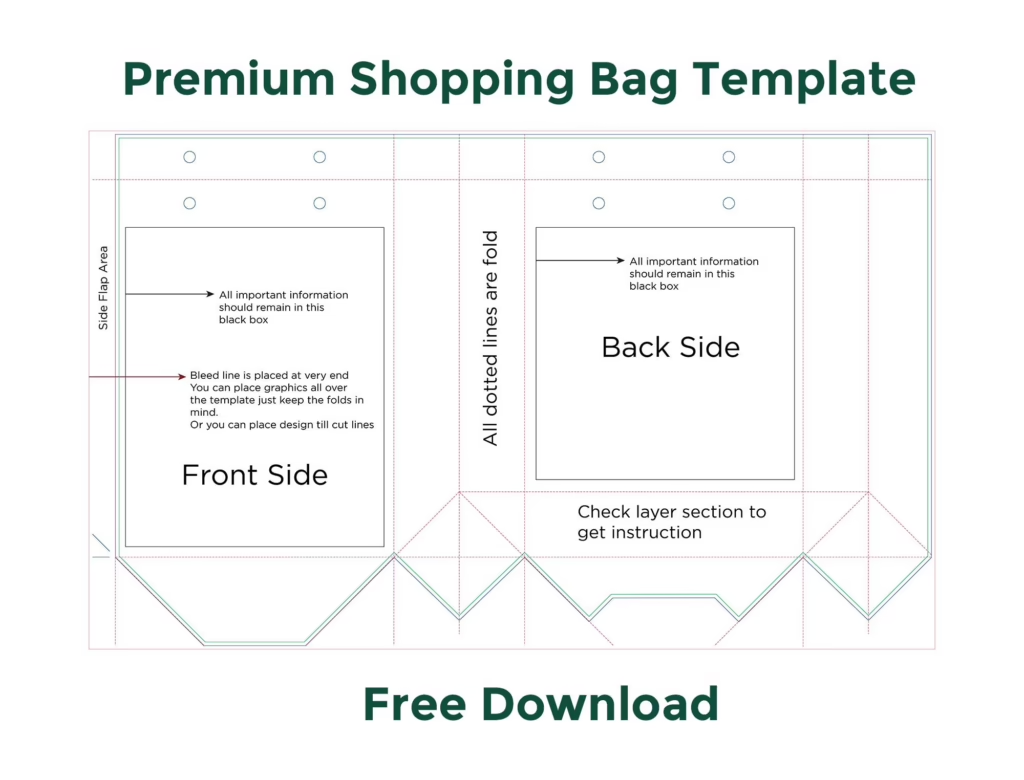
Looking for a retail-ready shopping bag template pre-calibrated for commercial packaging manufacturing? This free vector dieline package provides the exact structural blueprint for a luxury boutique shopping bag measuring 9.6″ (Width) × 13.0″ (Height) with a 4.5″ side and bottom gusset. Engineered with reinforced top turnover hems, side crease score lines, bottom envelope fold tabs, and handle hole punch guides to deliver a flawless branded retail experience.
📐 Shopping Bag Blueprint & Structural Dimensions
Packaging dielines require complete visualization of both flat manufacture spreads and assembled three-dimensional boxes. Review the pre-calibrated structural dimensions below:
Outer Boundary
Extend all exterior bag background colors and full-bleed artwork out to this perimeter to prevent unprinted edges during rotary die-cutting.
Retail Dimensions
The physical 3D dimensions when assembled: 9.60″ front/back width, 13.00″ vertical height, and 4.50″ side gusset depth.
Front & Back
Keep all primary brand logos, social handles, and typography within this boundary to stay clear of side gusset folds, bottom flaps, and handle holes.
📂 Structural Anatomy of the Packaging Dieline
This vector template is divided into functional packaging sections that fold together to create a durable, weight-bearing shopping bag:
- Top Turnover Hem (1.50″ Reinforcement Zone): The upper flap folds inward 180 degrees over an inserted cardboard reinforcement strip. This creates a clean finished top edge and reinforces the punched handle eyelets against tearing.
- Front & Back Main Panels (9.60″ × 13.00″): The primary billboard areas for your retail branding, luxury typography, and promotional illustrations.
- Side Gussets with Center Crease Lines (4.50″ Wide): Dual side panels pre-scored with central vertical and diagonal score lines, allowing the bag to fold flat for storage and expand effortlessly at checkout.
- Bottom Envelope Flaps & Glue Tabs: Four interlocking bottom flaps that seal securely with high-strength packaging adhesive over an interior cardboard floor insert.
- Punched Handle Holes: Precision vector circles indicating standard drill positions for cotton rope, satin ribbon, or die-cut handles.
🛠️ Step-by-Step Tutorial: Customizing Your Shopping Bag in Illustrator
Step 1: Open the Vector Dieline & Set CMYK Workflow
Open shopping-bag-template-9.6x4.5x13.ai in Adobe Illustrator. Ensure your document color mode is CMYK Color (File > Document Color Mode > CMYK). Check that the dieline layers are locked so you do not accidentally shift cut or crease paths while arranging your artwork.
Step 2: Placing Graphics on the Main Billboard Panels
Select your ARTWORK layer:
- Center your primary brand logo on the Front Panel, maintaining at least 2.5 inches of clearance below the top trim line so handle hardware does not obscure your emblem.
- On the Back Panel, position supporting brand copy, company values, flagship store locations, or web handles.
- On the Side Gussets, consider placing website URLs, minimalist icons, or subtle tone-on-tone patterns that display elegantly when the bag expands.
Step 3: Handling the Bottom Flaps and Glue Zones
The bottom flaps fold and overlap underneath the bag:
- Do not place important contact text or fine line logos across the bottom flap seams, as glue overlap will conceal portions of the design.
- Keep side glue tabs unvarnished: excessive coatings prevent packaging adhesives from bonding properly.
Step 4: Converting Typography to Outlines
Once your artwork layout is finalized, select all objects (Ctrl + A / Cmd + A) and press Ctrl + Shift + O / Cmd + Shift + O to outline all live fonts into vector paths.
🖨️ Commercial Pre-Press & Packaging Checklist
- ✓ File Format: Export as PDF/X-1a:2001 or PDF/X-4 with all crop marks and 0.125″ bleed enabled.
- ✓ Dieline Setup: Cut paths set to 100% Spot Magenta Overprint; crease/score lines set to 100% Spot Cyan Overprint.
- ✓ Image Resolution: All linked photographic artwork verified at 300+ DPI at 100% scale.
- ✓ Cardboard Reinforcements: 350 GSM top rim and bottom floor cardboard insert specifications included for the manufacturing die-cutter.
📦 Paper Stock & Handle Finishing Recommendations
- 200–250 GSM Art Cardstock: The premier choice for high-end boutique shopping bags. Delivers clean, crisp creases and support for heavy merchandise.
- Kraft Paperboard (Natural Brown or Bleached White): Perfect for eco-conscious retail brands seeking an authentic, sustainable organic aesthetic.
- Matte Lamination: Essential for preventing scuffs on dark-printed bags while providing weather resistance.
- Handle Options: Knotted cotton rope handles, grosgrain ribbon, or die-cut oval handles reinforced with eyelets.
❓ Frequently Asked Questions (FAQ)
What handle types are supported by this template?
The template includes pre-calibrated punch marks for standard knotted rope and ribbon handles. You can easily remove the punch holes if your manufacturer uses glued turnover flat paper handles or die-cut handles.
How much weight can a bag built from this dieline support?
When manufactured using 200+ GSM art cardstock with top rim and bottom cardboard reinforcements, this 9.6″ × 13″ × 4.5″ bag safely supports 8 to 12 pounds (3.5 to 5.5 kg) of retail merchandise.
Can I print on the inside of the shopping bag?
Yes. Commercial packaging converters support dual-sided 4/4 printing. You can apply an interior color flood or repeating brand pattern on the reverse side of the board for an unboxing surprise.
Is this vector shopping bag dieline royalty-free for commercial client work?
Yes. DesignoFly Studio provides this vector dieline under an unrestricted free commercial license. You can produce, customize, and print unlimited bags for client retail brands worldwide without paying royalty fees.