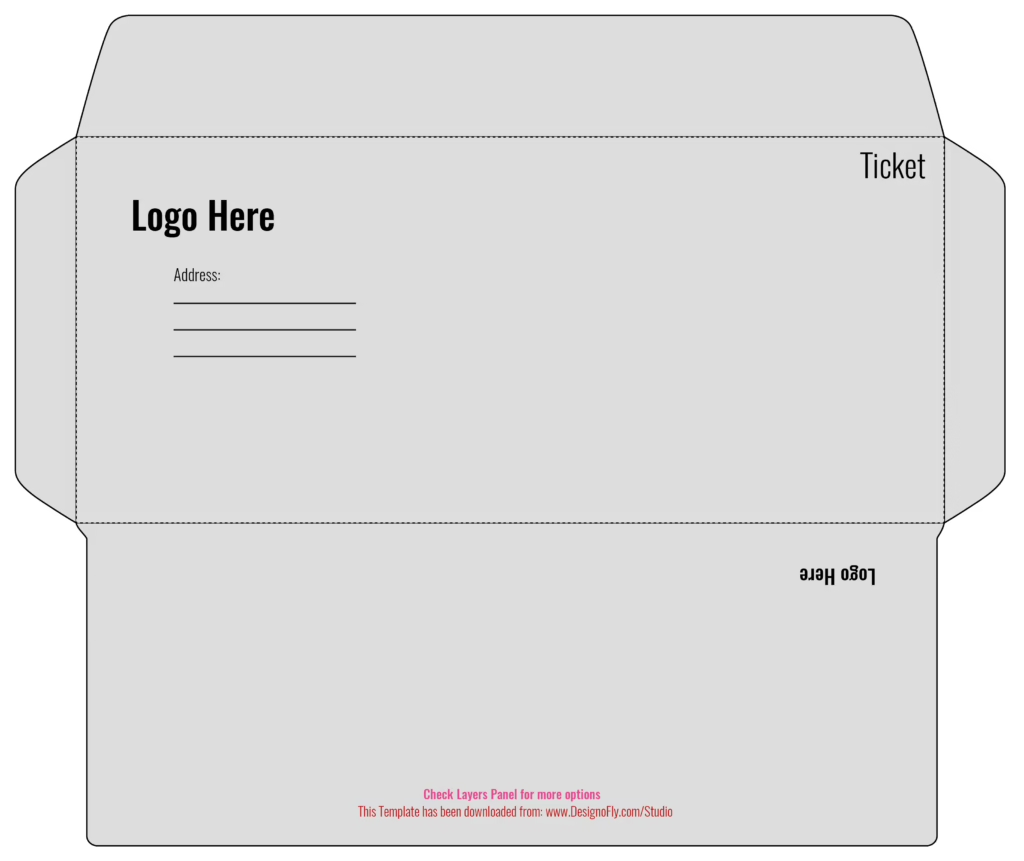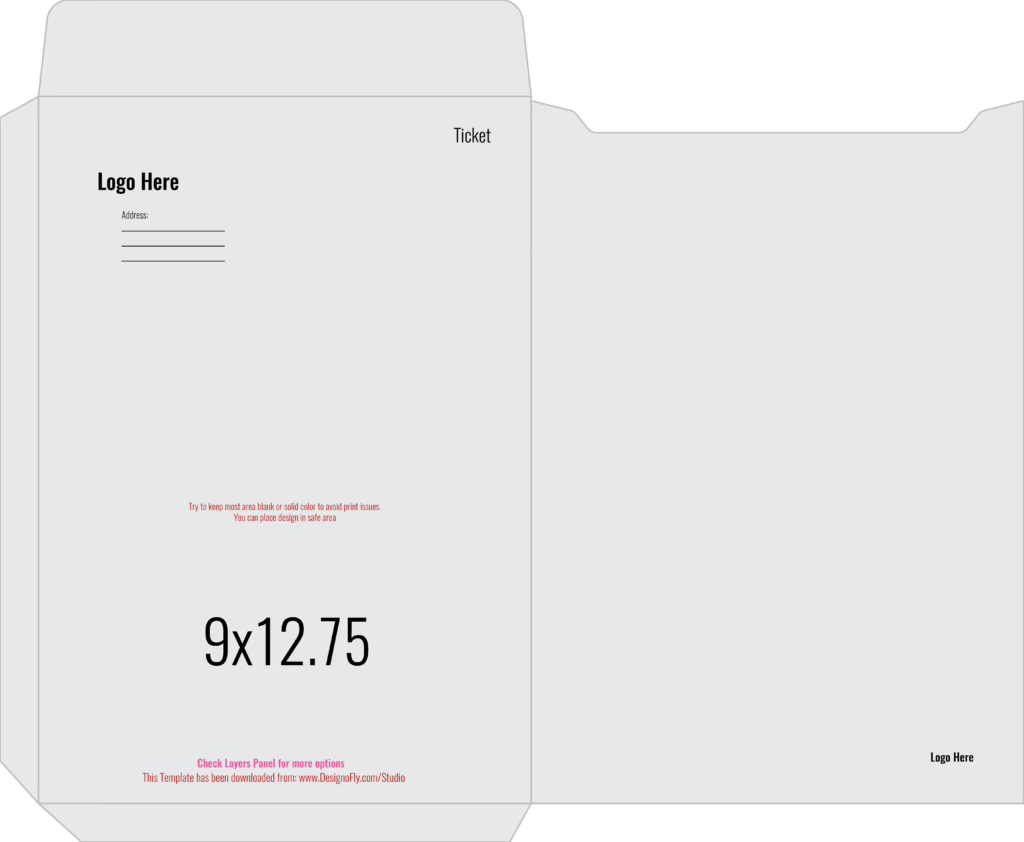
Looking for a professional c4 envelope template designed to hold full unfolded A4 documents, legal contracts, corporate catalogs, certificates, and presentation folios? This free vector dieline from DesignoFly Studio is engineered strictly to ISO 269 paper packaging standards. Sized at 9.0″ × 12.75″ (324 mm × 229 mm), it provides the exact commercial specifications needed for premium catalog envelopes with secure pocket flap closures.
📐 C4 Envelope Blueprint & Structural Dimensions
A C4 envelope is sized specifically to house flat A4 sheets (210 mm × 297 mm) without folding. Review the structural packaging dimensions below:
Outer Boundary
Extend all exterior artwork and color fills out to this perimeter to prevent white unprinted edges during rotary high-speed die-cutting.
C4 Standard
The physical finished dimensions of the folded C4 envelope. Features a standard pocket-style top opening flap and side seam glue tabs.
Postal Standards
Keep all return branding, recipient addresses, and logos at least 0.25″ inward from all cut edges and score lines to ensure postal compliance.
📂 Template Architecture & Vector Layer Hierarchy
This vector template is divided into isolated layers configured for commercial envelope printing presses:
- [DO NOT PRINT] DIE-LINE & CUT MARKS: Features the 100% Magenta Spot Color cutting strokes and cyan dashed creasing paths. Pre-set to Overprint Stroke mode so your artwork prints underneath smoothly.
- GUIDES & POSTAL MARGINS: Visual guidelines indicating postal clear zones, stamp boundaries, and safe margins.
- FRONT ARTWORK: The recipient-facing front panel for your company logo, return address, and promotional branding.
- BACK ARTWORK & FLAP: The rear envelope panel and sealing flap for return seals, security messaging, or secondary graphics.
🛠️ Step-by-Step Tutorial: Customizing Your C4 Envelope in Illustrator
Step 1: Verify CMYK Color Workflow
Open c4-envelope-template.ai in Adobe Illustrator. Check that File > Document Color Mode > CMYK Color is active. Packaging printing uses process inks; working in RGB will cause color dullness upon physical production.
Step 2: Positioning Return Branding & Postal Zones
Place your visual assets on the FRONT ARTWORK layer:
- Top-Left Corner: Position your full-color corporate logo and return address within a 3.5″ × 2.0″ area, maintaining 0.25″ clearance from the edges.
- Postage / Permit Indicia: Reserve the upper-right corner (1.75″ × 1.75″) for a postal stamp or pre-printed corporate postage permit.
- Address Window / Clear Space: Leave the center-right area completely clear for typed recipient mailing labels or calligraphy.
Step 3: Designing the Closure Flap
The top flap opens along the short 9.00″ edge (standard catalog/pocket style):
- You can print a solid accent color or your brand tagline on the exterior of the closure flap.
- Do not place ink across the interior gummed adhesive strip: ink prevents water-based gum or peel-and-seal tape from adhering properly.
Step 4: Outlining Typography
Select all text across all layers (Ctrl + A / Cmd + A) and press Ctrl + Shift + O (Windows) or Cmd + Shift + O (Mac) to outline fonts into vector shapes before saving the production file.
🖨️ Commercial Pre-Press Checklist
- ✓ File Export: Export as PDF/X-1a:2001 with 300 DPI raster sampling.
- ✓ Bleed Verification: Ensure 0.125″ document bleed is enabled across the flat spread.
- ✓ Dieline Color: 100% Spot Magenta Overprint verified in the Attributes panel.
- ✓ Glue Tab Area: Adhesive areas kept 100% clean and free of varnish or heavy ink floods.
📦 Paper Stock & Opacity Recommendations
- 80lb / 100lb Heavyweight Text Paper: Essential for C4 catalog envelopes to prevent tearing when holding thick 30+ page documents or catalogs.
- White Wove vs. Brown Kraft: White wove offers a bright, professional background for vibrant brand logos; kraft delivers durable tear resistance and a sustainable aesthetic.
- Peel & Seal Adhesive Strip: The most durable commercial closure, protected by a peel-off release liner for clean, mess-free sealing.
❓ Frequently Asked Questions (FAQ)
What size documents fit inside a C4 envelope?
A C4 envelope (324 × 229 mm) is engineered to hold flat, unfolded A4 sheets (210 × 297 mm), presentation folders, magazines, and commercial catalogs up to 0.25 inches thick.
What is the difference between a pocket envelope and a wallet envelope?
A pocket envelope opens along the short edge (like this C4 template), making it ideal for inserting flat catalogs and reports. A wallet envelope opens along the long edge, which is standard for mailing checks and letters.
Can I print full-bleed artwork across the entire envelope?
Yes. When printing on flat unfolded sheets prior to die-cutting and assembly, you can print full-bleed vibrant artwork across all exterior surfaces.
Is this C4 envelope dieline free for commercial client branding?
Yes. This template is 100% free for both personal and commercial production under DesignoFly Studio’s open commercial license. No royalties or attribution required.