

The Screengrab Trap: Why OS Screenshots Ruin 4K Video Stills
Whether you are an independent YouTube creator seeking the ultimate thumbnail facial expression, a forensic video analyst documenting an incident, or a digital marketer repurposing webinar footage for carousel slides, extracting a high-resolution still image from recorded video is an essential daily workflow.
Most creators pause the video player and hit PrintScreen or Cmd+Shift+4. This traditional screengrab habit ruins your output in four critical ways:
⚠️ The 4 Traps of Manual Screen Captures
1. Display Scaling Degradation: If you watch a 4K video (3840×2160) on a 1080p monitor or a laptop screen scaled to 125%, hitting screenshot captures only the downscaled 1920×1080 display buffer—destroying 75% of the raw sensor data.
2. Sub-Pixel Motion Blur & Interframe Jitter: Standard media players pause between keyframes (I-frames) using interpolated motion predictions, creating blurred edges and ghosting around moving subjects.
3. Player UI Overlays & Timers: Hovering to pause inevitably leaves progress bars, play buttons, and volume sliders burned onto your screenshot.
4. The Cloud Upload Privacy Liability: Online video frame extractors force you to upload multi-gigabyte video files to their remote servers, eating bandwidth, queueing behind freemium speed limits, and exposing private unreleased footage.
MetaoFly developed Video Frame Extractor & Snapshot Studio to provide direct, hardware-accelerated access to the underlying video stream right inside your browser. No files are uploaded over the internet; video decoding runs directly on your local device GPU.
Under the Hood: HTML5 Canvas Video Rasterization & Millisecond Seeking
MetaoFly’s extraction pipeline operates directly on hardware-decoded video frames via modern browser multimedia APIs:
- True Native Dimensions Decoding: The engine reads the video’s intrinsic
videoWidthandvideoHeightproperties rather than the CSS display dimensions. A 4K video (3840×2160) is always rasterized to an internal 4K canvas buffer regardless of your monitor size. - Precise Millisecond Frame Seeking: Standard HTML video sliders snap to coarse second intervals. MetaoFly utilizes high-precision fractional float time stamps (
currentTime = t + 0.0333for 30 FPS or0.0166for 60 FPS), enabling surgical frame-by-frame stepping without missing the crucial micro-second action. - Lossless PNG / 100% Quality WebP Encoding: The extracted 2D canvas context is serialized via
toBlob('image/png'), ensuring full 8-bit or 10-bit color reproduction with zero lossy compression artifacts. - Client-Side ZIP Archiving: When batch extraction is triggered (e.g. 1 frame every second), MetaoFly streams blobs directly into an in-memory JSZip container, compiling an instant download package without touching a remote cloud server.
Step-by-Step Guide: Extracting 4K Frames in MetaoFly
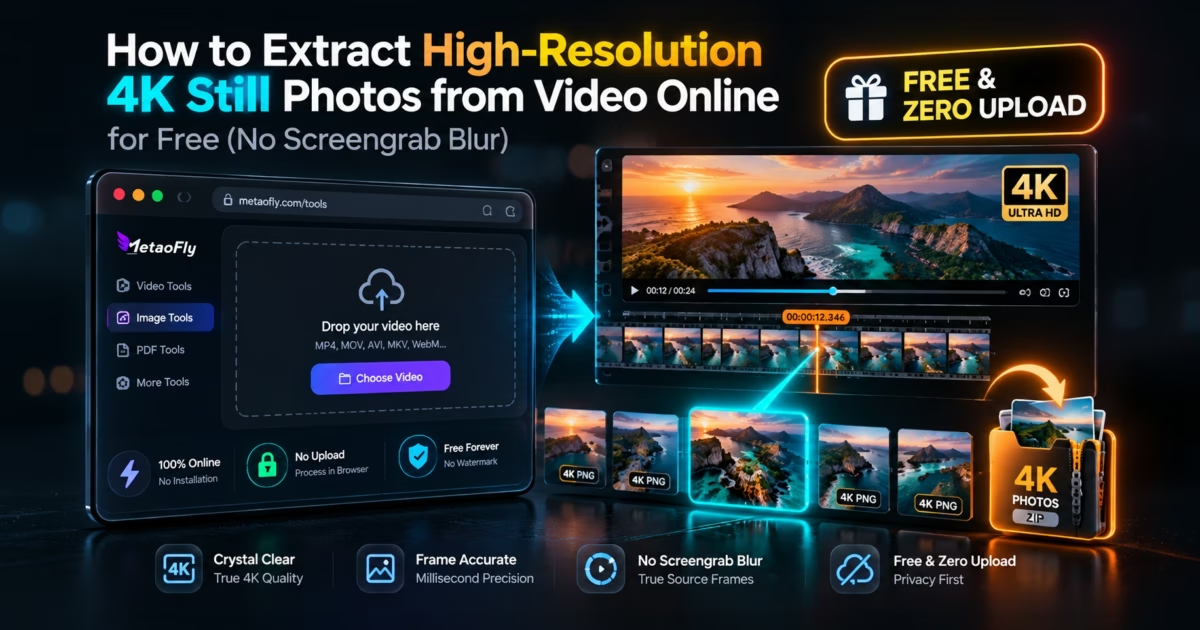
MetaoFly Video Frame Extractor features an efficient 2-column multimedia workspace (Left: High-DPI Video Viewport with Precision Time Scrubbing; Right: Frame Controls, Snapshot Gallery & ZIP Exporter).
Drop Your Video into the Player Stage
Navigate to Video Frame Extractor Studio. Drag and drop any MP4, MOV, WebM, or MKV file onto the canvas. Because files are decoded locally in your browser memory, even massive 4K footage opens instantaneously with zero upload wait time.
Navigate with Millisecond Precision Controls
Play or scrub through the timeline to reach the approximate scene. Next, use the Step Forward (+1 Frame) and Step Backward (-1 Frame) buttons, or use the arrow keyboard shortcuts to advance frame-by-frame until the perfect freeze-frame moment is visible on the canvas.
Capture Single Frame or Configure Batch Range
Click ‘Capture Current Frame’ to take an instant snapshot. The extracted photo appears in the right gallery drawer with exact timestamp metadata. If you need a sequence of photos (e.g. for motion studies or animated GIFs), enter a start/end time and interval (e.g. 1 frame every 0.5 seconds) and click ‘Batch Extract Sequence’.
Download Uncompressed PNGs or Consolidated ZIP
Select your preferred export format: Lossless PNG (preserves maximum clarity for printing & thumbnails) or Optimized WebP / JPG (for web sharing). Click individual download buttons or select ‘Download All Frames (.ZIP)’ to save the entire collection in one structured archive.
Video Resolution vs Extracted Photo Specifications
When extracting still frames, the output photo dimensions match your video’s native recording stream:
| Video Quality Tier | Native Video Resolution | Extracted Photo Dimensions | MegaPixels (MP) | Best Use Case |
|---|---|---|---|---|
| 4K Ultra HD (2160p) | 3840 × 2160 px | 3840 × 2160 px | 8.3 MP | Print posters, 4K YouTube thumbnails |
| 2.5K QHD (1440p) | 2560 × 1440 px | 2560 × 1440 px | 3.7 MP | Social media banners & website hero cards |
| Full HD (1080p) | 1920 × 1080 px | 1920 × 1080 px | 2.1 MP | Blog post illustrations & presentation slides |
| Vertical Reels/TikTok (1080p) | 1080 × 1920 px (9:16) | 1080 × 1920 px | 2.1 MP | Instagram Story & TikTok cover frames |
Frequently Asked Questions (FAQ)
Does extracting frames on MetaoFly compress or blur the photo?
No. MetaoFly captures the exact native pixel buffer of the decoded video frame into a lossless PNG, retaining 100% of the camera sensor sharpness with zero compression degradation.
Are my proprietary video files uploaded to a remote server?
No. The entire decoding, millisecond scrubbing, and frame extraction process runs 100% client-side in your web browser. Your video never leaves your local computer.
What video formats are supported?
MetaoFly supports all modern video formats natively supported by browsers, including MP4 (H.264 / H.265 / AV1), WebM (VP8 / VP9), QuickTime MOV, and MKV.
Can I batch export frames at automated time intervals?
Yes. You can define a custom interval (e.g. 1 frame every second or every 5 seconds) across any segment of your video and download all extracted images bundled into a single ZIP file.
Standards documentation: Built in compliance with the W3C Media Source Extensions (MSE) Architecture and the W3C WebCodecs VideoFrame Specification.