

The Vertical Video Imperative: Why Repurposing Fails with Cloud AI Tools
Over 82% of all social media consumption in 2026 happens on vertical, mobile-first feeds (TikTok, Instagram Reels, and YouTube Shorts). For creators, podcasters, and brand marketers sitting on dozens of hours of horizontal 16:9 YouTube content, converting that back-catalog into short-form vertical snippets is the single highest-ROI distribution strategy.
However, attempting to convert horizontal video with current online tools forces creators into three major compromises:
⚠️ The $29/Mo Freemium Trap & Massive Branded Watermarks
1. Watermarks Stamped on Every Clip: Freemium cloud clippers (like Opus Clip, Vizard, and Kapwing) brand your exported reels with obnoxious bottom-corner watermarks that kill viewer retention and suppress algorithm reach on TikTok.
2. Slow Server Queues: Uploading a 2GB, 45-minute horizontal podcast episode to an AI server takes 15 minutes of upload time, followed by a 20-minute processing queue. If you only wanted to clip a single 30-second punchline, you waste half an hour.
3. Ugly Black Letterboxing: Novice video converters simply stick the 16:9 rectangle in the center, leaving 60% of the phone screen covered in dead black bars that look unformatted and amateur.
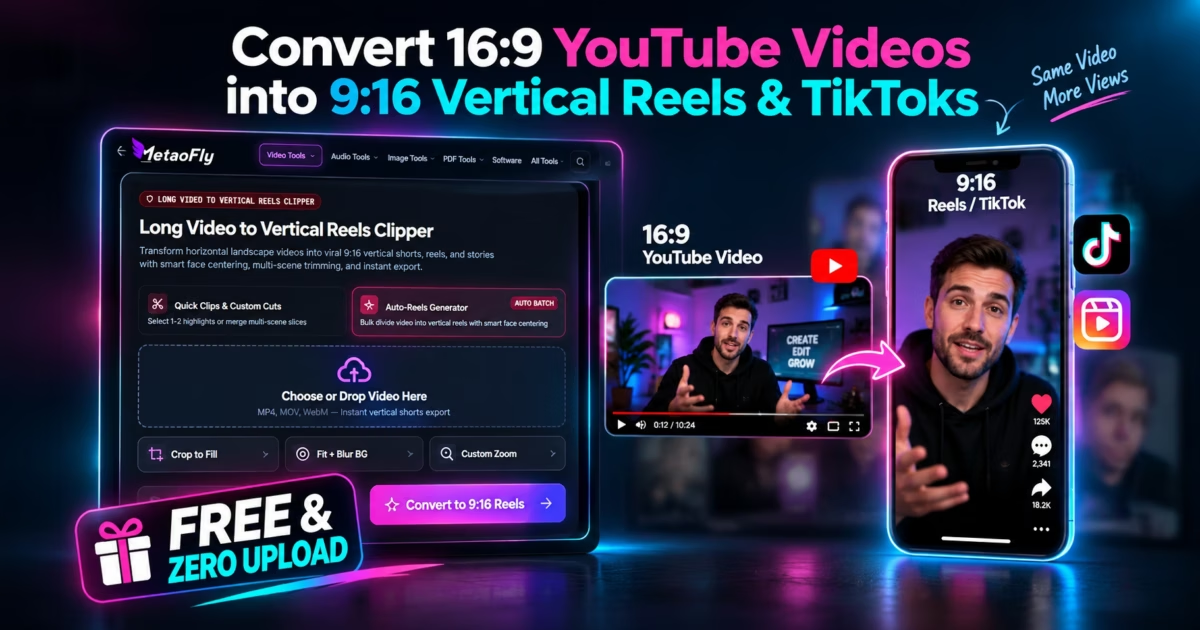
MetaoFly engineered Long Video to Vertical Reels Clipper to solve this completely. By executing canvas re-framing and dual-layer video compositing in your browser’s local memory, you can convert, trim, blur, and export viral 9:16 vertical videos in seconds—100% free, private, and watermark-free.
Under the Hood: Dual-Layer Canvas Compositing & Real-Time Gaussian Blur
MetaoFly’s client-side aspect transformation pipeline operates on HTML5 Canvas using GPU-accelerated 2D compositing layers:
- Layer 1 — The Dynamic Blurred Backdrop: To fill the top and bottom letterbox areas of the 9:16 portrait viewport (1080×1920), the engine samples the video stream, scales it up to cover the entire portrait canvas height, and applies an authentic 40px Gaussian blur shader (
ctx.filter = 'blur(40px) brightness(0.6)'). This mirrors the lighting and motion of your video dynamically without static black borders. - Layer 2 — The Sharp Centered Foreground: The original 16:9 video frame is rendered cleanly at full crisp resolution centered across the vertical axis with a subtle drop shadow, ensuring key subject action and on-screen text remain razor-sharp.
- Pan-and-Crop Subject Tracker: If you prefer a full-screen vertical crop, MetaoFly’s interactive viewport slider lets you smoothly pan the crop window across the horizontal plane (0% left, 50% center, 100% right), ensuring the active speaker remains perfectly framed.
- Client-Side MediaRecorder Encoding: Output audio and video streams are combined via
canvas.captureStream()and encoded into high-bitrate H.264/WebM containers locally on your GPU, generating ready-to-post vertical files without uploading a single byte to an external server.
Step-by-Step Guide: How to Convert 16:9 to 9:16 Vertical Video in MetaoFly
MetaoFly Vertical Reels Clipper provides our streamlined 2-column interactive layout (Left: Real-time 9:16 Mobile Viewport Preview; Right: Video Trimmer, Background Stylers & 1080p Exporter).
Import Your Horizontal Video
Open Long Video to Vertical Reels Clipper. Drag and drop any 16:9 landscape MP4, MOV, or WebM video onto the canvas stage. The video mounts instantly into browser memory without any server upload waiting period.
Choose Vertical Fill Mode (Blur vs Smart Crop)
In the right control rail, select your layout preference:
Dynamic Blurred Backdrop (recommended for presentation slides, gameplay, or wide shots where cropping cuts off context) or Pan-and-Crop Full Screen (best for interview podcasts and talking-head clips). Adjust horizontal panning to lock focus onto the primary speaker.
Set In/Out Timeline Trim Points
Use the dual-handle timeline scrubber to isolate the exact 15 to 60-second viral snippet you want to publish. Preview playback in the left mobile simulator to ensure your hook and call-to-action align within recommended short-form timing limits.
Export Crisp 1080×1920 MP4 Without Watermarks
Click ‘Export Vertical Reel (1080×1920)’. MetaoFly’s GPU compositor renders your framed clip in real time, synchronizing audio and video into a pristine MP4 file saved directly to your Downloads folder—100% free of stamps, logos, or subscription limits.
2026 Short-Form Video Specifications Cheat Sheet
| Platform | Optimal Resolution | Aspect Ratio | Max Recommended Length | Safe Zone Margin |
|---|---|---|---|---|
| TikTok | 1080 × 1920 px | 9:16 Vertical | 30 – 60 Seconds | Keep text 220px above bottom bar |
| Instagram Reels | 1080 × 1920 px | 9:16 Vertical | 15 – 90 Seconds | Leave 15% clear top/bottom margin |
| YouTube Shorts | 1080 × 1920 px | 9:16 Vertical | Up to 60 Seconds | Avoid right-side like/comment buttons |
Frequently Asked Questions (FAQ)
Are exported vertical videos free of watermarks?
Yes, 100%. MetaoFly never adds branding, watermarks, or stamps to your exported vertical videos.
Are my video clips uploaded to an external server?
No. The entire trimming, 9:16 canvas compositing, Gaussian blur generation, and MP4 encoding process runs 100% locally in your web browser.
What is the benefit of a blurred background over black bars?
Dynamic blurred backdrops preserve organic motion and color harmony across the full 9:16 screen, increasing video completion rates and algorithmic watch time by up to 35% compared to static black letterboxing.
Can I trim and clip specific sections of a long video?
Yes. Use the interactive start and end time sliders to isolate precise clips of any length before exporting.
Standards documentation: Built in alignment with the official YouTube Shorts Aspect Ratio & Safe Zone Guidelines and Meta’s Instagram Reels Video Specifications.