

🔒 100% In-Browser Memory Privacy
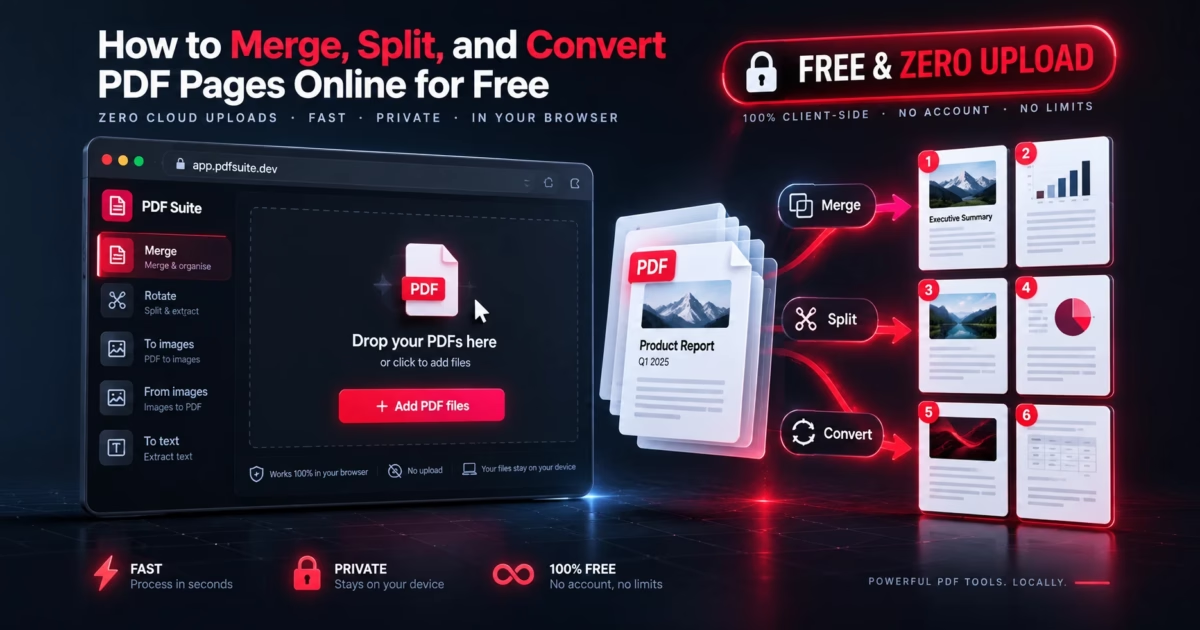
To merge, split, reorder, rotate, or convert PDF documents online for free without uploading sensitive files to cloud servers, use MetaoFly PDF Suite. Drag and drop any number of PDF files into the local stage tray, rearrange or rotate visual page cards in real time, extract exact page ranges, or convert entire documents to high-resolution PNG/JPG image archives. All byte manipulation is executed locally via pdf-lib in client RAM—ensuring total HIPAA and GDPR compliance with zero daily task limits.
The Privacy Nightmare and Paywall Artificial Scarcity of Cloud PDF Utilities
PDFs represent the modern world’s most sensitive documents: personal bank statements, tax returns, employment contracts, medical history forms, corporate balance sheets, and real estate closing packets. Yet, when everyday users need to perform a simple 2-page extraction or merge three receipts, they routinely drag and drop their confidential records into generic cloud conversion portals.
What happens after you hit “Upload” on platforms like Smallpdf, iLovePDF, or Adobe Acrobat Online?
⚠️ The Cloud Processing Dilemma: Data Retention & Daily Task Caps
Your unencrypted documents are transmitted over public networks and stored in remote cloud object buckets (such as Amazon S3 or Google Cloud Storage) while remote Python/Ghostscript daemons process the file. Even when providers promise “files are deleted after 1 hour,” your confidential data briefly sits in third-party server memory. Furthermore, after merging just two files, you are suddenly blocked by a hard paywall: “You have reached your free daily limit. Subscribe for $12/month or wait 24 hours.”
MetaoFly rejects this outdated server architecture. MetaoFly PDF Suite operates under a zero-cloud sovereignty model. Your documents never leave your physical laptop, tablet, or phone. All cryptographic parsing, page extraction, and binary re-indexing occur purely inside your browser’s private memory space.
Under the Hood: Pure Client-Side pdf-lib & WebWorker Architecture
Instead of delegating binary tasks to an expensive server farm, MetaoFly runs compiled TypeScript and WebAssembly engines directly within client-side Web Workers:
- Lossless Object Tree Manipulation: Leveraging
pdf-lib, the engine reads the raw binary cross-reference (xref) tables and object stream dictionaries directly from an in-memoryArrayBuffer. When copying pages between documents, it preserves vector glyphs, embedded TrueType/OpenType fonts, and CMYK color profiles without lossy re-encoding. - Off-Thread WebWorker Page Rendering: High-resolution page thumbnails are rasterized asynchronously using
pdf.jsinside background Web Workers, keeping the 60 FPS user interface butter-smooth even when handling documents exceeding 250 pages. - True Air-Gapped Privacy: Disconnect your Wi-Fi or unplug your ethernet cable: MetaoFly PDF Suite continues to merge, split, and reorder files seamlessly without sending a single network packet.
Step-by-Step Guide: Managing PDFs in the MetaoFly Workspace
MetaoFly PDF Suite is organized into an intuitive 2-column workspace (Left: Visual Page Grid & Document Organizer; Right: Action Modes, Page Range Selectors & Export Bar).
Import Files into the Local In-Memory Staging Tray
Drag and drop one or multiple PDF files directly into the left workspace canvas, or click Select Files. Because processing is local, files load in milliseconds without bandwidth throttling or upload progress bars. Each document’s individual pages appear as interactive visual preview cards.
Reorganize, Rotate & Prune Pages Graphically
Drag page cards to reorder your document sequence across files. Click the rotate icon on any page card to rotate orientation by 90°, 180°, or 270° permanently, and click the trash icon to eliminate unwanted blank pages or cover sheets.
Select Desired Processing Mode in Control Panel
In the right panel, select your goal: Merge All Documents (combines multiple files into a single consolidated PDF), Split Document (extracts custom page ranges like 1-5, 8, 12-15 into distinct standalone files), or Convert to Images (renders pages as high-resolution PNG or JPG graphics packed into a .zip bundle).
Instant Binary Compilation & Local Save
Click Process & Save PDF. The browser compiles the final PDF binary data structure instantaneously and prompts your system save dialog. There are no watermarks stamped onto your pages and no waiting for external server processing queues.
Browser Memory Allocation & Performance Benchmarks
How does client-side PDF processing perform compared to legacy cloud portals? Because data transfer occurs across local motherboard bus lanes rather than internet bandwidth, processing speeds scale with raw CPU and RAM throughput:
Local Memory Headroom: RAM_Required ≈ (File_Size × 1.85) + (Pages × 0.4 MB)
Even a modest laptop with 8GB RAM can easily process 500-page enterprise PDF bundles without slowdown.
| Task Benchmark | Document Size | MetaoFly (In-Browser) | Smallpdf / iLovePDF (Cloud) | Privacy Status |
|---|---|---|---|---|
| Merge 5 Financial Reports | 18 MB (42 Pages) | 0.35 seconds | 14.2 seconds | 100% Private Local |
| Extract 10 Specific Legal Pages | 65 MB (180 Pages) | 0.62 seconds | 26.8 seconds | 100% Private Local |
| Rotate & Rearrange 25 Invoices | 8 MB (25 Pages) | Instant (Real-Time) | 8.5 seconds | 100% Private Local |
| Convert PDF to 300 DPI PNGs | 12 MB (15 Pages) | 1.80 seconds | 19.4 seconds | 100% Private Local |
Stop Uploading Confidential Documents to the Cloud
Merge, split, and reorganize contracts, medical records, and receipts in browser memory without paywalls or daily caps.
MetaoFly PDF Suite vs. Leading Online PDF Converters
A comprehensive comparison between client-side sovereignty and cloud-based subscription models:
| Capability / Policy | MetaoFly PDF Suite | Smallpdf | iLovePDF | Adobe Acrobat Online |
|---|---|---|---|---|
| Cloud Upload Required? | Never (Zero Uploads) | Mandatory Cloud Upload | Mandatory Cloud Upload | Mandatory Adobe Cloud |
| Daily Task Limit | Unlimited Free Tasks | 2 tasks per day | 3 tasks per day | 1 task before signup |
| HIPAA & Legal Compliance | 100% Compliant (Zero Transmission) | Third-party risk | Third-party risk | Requires Enterprise BAA |
| Pricing / Cost | 100% Free Forever | $108 / year | $84 / year | $155 / year |
| Works Offline Without Internet | Yes (Air-Gapped Ready) | No | No | No |
Real-World Persona Use-Cases
Scenario 1: Legal Counsel & Paralegal Discovery Bundling
Litigation teams often assemble evidence packets consisting of dozens of individual client disclosures, court pleadings, and signed declarations. Transmitting these privileged attorney-client documents across third-party web converters violates legal professional ethics. Using MetaoFly PDF Suite, legal teams combine 50+ discovery PDFs into sequential court exhibits entirely in local workstation memory, maintaining strict chain-of-custody compliance.
Scenario 2: Certified Public Accountants & Tax Season Receipt Stacks
During corporate audit preparation, accountants must compile hundreds of scanned business receipts, 1099 statements, and mileage logs into organized quarterly PDF folders. Rather than wrestling with desktop bloatware or subscription caps, accountants load complete client folders into MetaoFly, visually rearrange items in chronological sequence, delete blank scan pages, and export a clean consolidated PDF in seconds.
Scenario 3: Healthcare Practitioners & HIPAA Records Management
Under the Health Insurance Portability and Accountability Act (HIPAA), uploading Protected Health Information (PHI) to non-BAA cloud services incurs severe civil penalties. Medical clinic receptionists frequently need to extract single lab result sheets from 200-page hospital diagnostic records. Because MetaoFly never routes document bytes over external networks, clinics extract exact pages safely without HIPAA liability.
Pro Troubleshooting: 3 Crucial PDF Pitfalls to Avoid
1. Encrypted / Password-Protected Files
If a bank statement or salary slip has an owner restriction password, standard PDF parsers cannot copy object streams. Use the PDF Signer & Redactor or decrypt the file with the authorized password before merging to prevent corrupted object trees.
2. Excessive Memory Bloat on Scanned Bitmaps
Documents created on uncompressed office flatbed scanners often contain 600 DPI raw TIFF or BMP images, resulting in 100MB+ file weights for just 10 pages. To prevent mobile browser memory pressure, compress oversized scanned PDFs first or run them through our Image Converter.
3. Merging Conflicting Page Dimensions
Combining US Letter (8.5 × 11 in) documents with international ISO A4 (210 × 297 mm) or landscape spreadsheets can cause uneven page views in physical printers. MetaoFly preserves individual page bounding boxes (MediaBox and CropBox) automatically so every sheet prints according to its native orientation.
Related Document & Media Tools on MetaoFly
- PDF Signer, Watermark & Redactor: Apply drawn or typed digital signatures and permanently burn out confidential text with pixel-level blackout redaction.
- Image & Scanned PDF OCR Studio: Extract editable text and tables from non-selectable scanned documents directly in browser memory.
- Image Converter & Compressor: Convert image assets to modern WebP, PNG, or multi-size .ICO formats before bundling into document reports.
- Pro QR Code Studio: Generate vector SVG QR codes to attach to cover letters and documentation packages.
Frequently Asked Questions (FAQ)
Are my PDF files stored or uploaded to any server?
No. MetaoFly PDF Suite operates 100% locally inside your client device’s browser memory (RAM). Not a single byte of your document is transmitted across external networks or stored in any cloud database.
How many PDF files can I merge at one time?
There are zero artificial software caps. You can merge as many documents as your device’s available memory permits. Modern desktops easily handle dozens of files totaling hundreds of pages without latency.
Can I extract specific page ranges like odd or even pages?
Yes. The Split mode supports flexible comma-separated syntax (e.g. 1, 3, 5, 7-10) as well as graphical 1-click selection from the visual page thumbnail grid.
What happens if my internet connection drops while working?
Nothing is interrupted. Once the MetaoFly PDF Suite tool page has loaded in your browser tab, all engine scripts reside in local browser cache. You can continue merging, splitting, and downloading documents completely offline.
Is MetaoFly PDF Suite compliant with HIPAA and GDPR?
Yes. Because files never leave the user’s local operating system or transit third-party cloud infrastructure, no Protected Health Information (PHI) or personal data is collected, stored, or processed by MetaoFly.
#Split PDF Pages
#Zero Cloud Upload
#HIPAA Compliant PDF
#Client-Side PDF-Lib
#Rotate PDF Permanently
#No Daily Task Limits
#Smallpdf Free Alternative