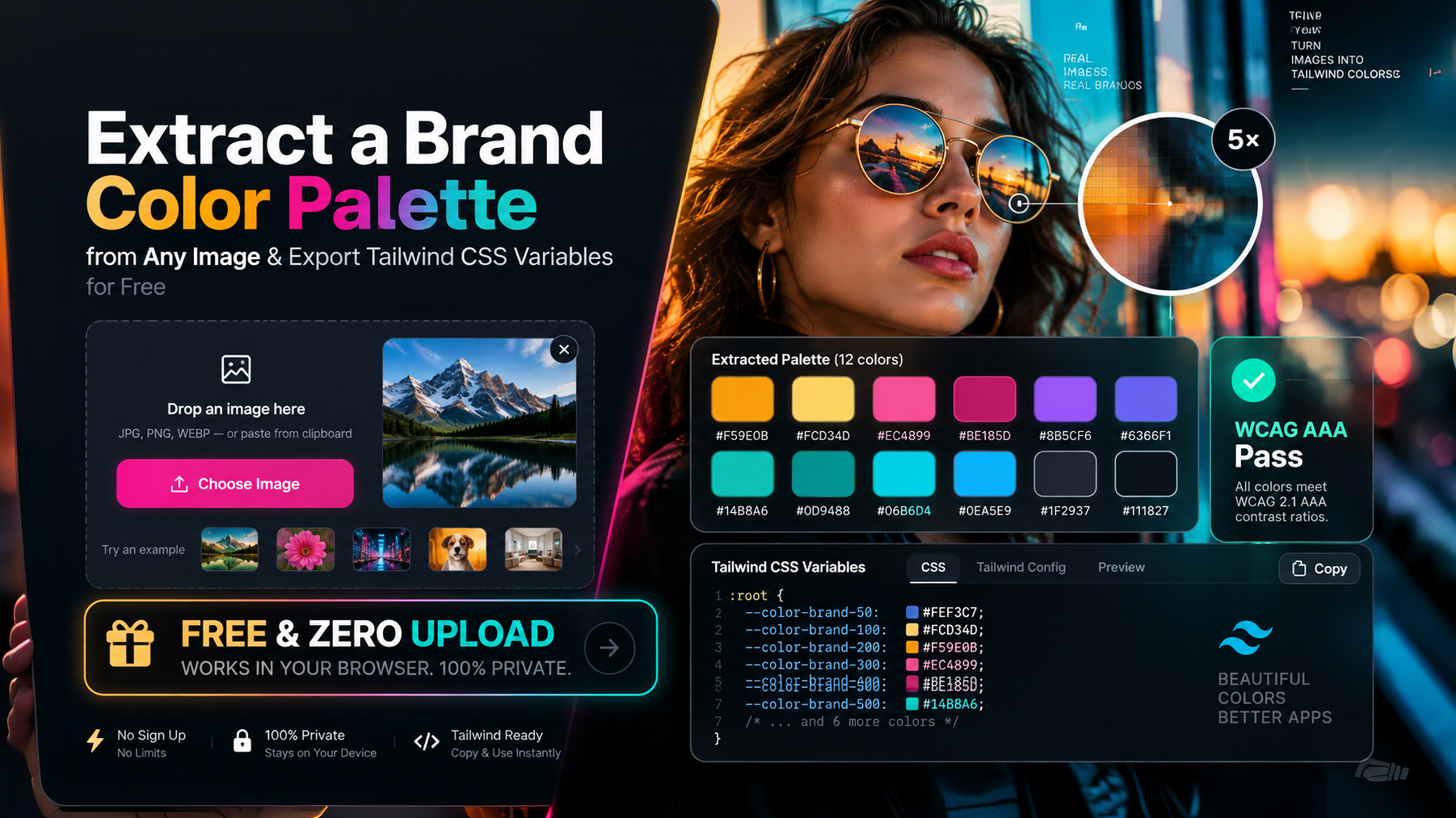
To extract a cohesive, production-ready brand color palette from any photograph or UI screenshot, use a client-side Median Cut color quantization engine paired with a live WCAG 2.1 relative luminance contrast auditor. Instead of manually sampling random pixels and switching between three separate websites to check ADA legibility and format Tailwind configs, MetaoFly Color Palette & Contrast Studio extracts 5 to 10 dominant swatches, calculates exact AA/AAA contrast grades, generates harmonic color schemes, and exports :root CSS variables or Tailwind CSS tokens in one click—100% free in your browser RAM.
- Perceptual Quantization + Pixel Loupe: Automatically cluster 5 to 10 dominant swatches via Median Cut quantization or sample exact sub-pixels using an interactive magnified eyedropper loupe.
- Built-In WCAG 2.1 AA & AAA Auditing: Verify normal text (4.5:1), large headings (3.0:1), and AAA contrast ratios (7.0:1) immediately—eliminating ada website color compliance guesswork before you write a line of CSS.
- 1-Click Production Code Export: Copy clean HEX, RGB, HSL,
:rootCSS custom properties, Tailwind CSS config objects, or JSON design tokens locally with zero account logins and zero cloud uploads.
The Fragmented Color Workflow Trap: Why Designers Waste Hours Context-Switching
Every UI/UX designer and frontend developer knows how painful the traditional color-system workflow is. You find an inspiring photograph, a competitor UI screenshot, or a client’s mood board, and you want to extract color palette from image assets to build a clean web theme.
When you search Google for an image color picker hex rgb or brand identity color extractor, the top-ranking sites force you into a fragmented, multi-tab obstacle course:
- The Coolors Paywall & Tab Shuffle (
coolors.co): Coolors ranks near the top of Google for palette generation, but its free tier restricts extended palette saving, locks advanced contrast-fixing tools behind a Coolors Pro subscription, and separates image extraction from full WCAG component auditing. - Adobe Color’s Account Gate (
color.adobe.com): Adobe’s color wheel and theme extractor are powerful, yet the interface is heavy, slow to load, and requires signing into an Adobe Creative Cloud account before you can save libraries or export clean developer code snippets. - WebAIM’s Manual Hex Silo (
webaim.org/resources/contrastchecker): WebAIM is the gold standard reference for accessibility backlinks, yet it only accepts manual 6-digit HEX inputs one pair at a time. It cannot inspect an image, generate harmonic accents, or export a Tailwind config. - Static Inspiration Feeds (
colorhunt.co,paletton.com,mycolor.space): Curated feed sites offer zero image quantization engines, while legacy generators lack modern design-token exports (--color-primaryCSS variables ortailwind.config.jsobjects).
Jumping back and forth between a coolors free alternative, an adobe color extractor alternative, and a webaim contrast checker alternative wastes 20 minutes per screen—and worse, uploading unreleased product UI screenshots to cloud servers exposes confidential designs before launch. A unified client side color analyzer collapses the entire pipeline into a single local workspace.
Under the Hood: Median Cut Quantization & WCAG 2.1 Relative Luminance Math
A naive pixel-averaging script fails miserably when extracting colors from real photographs because it blends vibrant brand accents with thousands of background sky or shadow pixels into muddy grey-brown averages. The MetaoFly Color Palette & Contrast Studio solves this using two deterministic mathematical engines running inside your browser’s local RAM.
1. Median Cut Color Quantization (ImageData Clustering)
When you drop an image onto the canvas, MetaoFly reads the raw RGBA pixel array via HTML5 CanvasRenderingContext2D.getImageData() and runs Median Cut color quantization:
- 3D RGB Bounding Box: All sampled pixels are plotted inside a three-dimensional Red-Green-Blue color cube (0 to 255 on each axis).
- Longest-Axis Range Detection: The algorithm measures the span (\max – \min) along the Red, Green, and Blue channels and identifies whichever channel has the widest perceptual variance.
- Median Partitioning: The pixel array is sorted along that widest color channel and sliced cleanly at the median pixel count into two sub-buckets.
- Recursive Subdivision: This splitting repeats recursively until the algorithm isolates 5 to 10 distinct high-density color clusters, returning the centroid HEX, RGB, and HSL values of your image’s true dominant and accent tones.
2. The Official WCAG 2.1 Relative Luminance & Contrast Ratio Formulas
Once your swatches are extracted, our built-in relative luminance calculator and wcag contrast checker 2.1 evaluate every swatch against pure white (#FFFFFF), pure black (#000000), and custom foreground/background pairs using the exact W3C mathematical specification.
First, each 8-bit sRGB channel (R_{8bit}, G_{8bit}, B_{8bit} \in [0, 255]) is normalized to C_{sRGB} = C_{8bit} / 255 and linearized to account for human non-linear gamma perception:
Next, relative luminance L (ranging from 0.0 for absolute black to 1.0 for absolute white) is computed using photopic luminosity weights—notice how human eyes perceive green (71.52%) as more than three times brighter than red (21.26%) and nearly ten times brighter than blue (7.22%):
Finally, the aa and aaa contrast ratio between the lighter color (L_1) and darker color (L_2) is calculated:
This produces a ratio between 1:1 (invisible text) and 21:1 (pure black on pure white). Here are the exact legal and accessibility thresholds required for ada website color compliance:
| WCAG 2.1 Conformance Level | Normal Body Text (< 18pt / < 24px) | Large Text (≥ 18pt regular or ≥ 14pt bold) | UI Components & Icons (Buttons, Borders, Focus Rings) |
| ----- | ----- | ----- | ----- |
| WCAG 2.1 Level AA (Minimum Legal Standard) | ≥ 4.5 : 1 | ≥ 3.0 : 1 | ≥ 3.0 : 1 |
| WCAG 2.1 Level AAA (Enhanced Gold Standard) | ≥ 7.0 : 1 | ≥ 4.5 : 1 | ≥ 3.0 : 1 |
3. Harmonic Color Wheel Geometry
For any extracted primary swatch, the studio automatically converts RGB into cylindrical HSL coordinates (Hue H \in [0°, 360°], Saturation S, Lightness L) to generate four mathematically balanced UI palettes:
| Color Harmony Mode | Hue Angle Offset Formula | Best UI / Brand Design Application |
| —– | —– | —– |
| Complementary | H_1 = H_0, \quad H_2 = (H_0 + 180°) \bmod 360° | High-contrast primary CTA buttons paired against dominant brand backgrounds |
| Analogous | H_0, \quad (H_0 ± 30°) \bmod 360° | Calm, cohesive multi-step cards, subtle mesh gradients, and nature/wellness themes |
| Triadic | H_0, \quad (H_0 + 120°) \bmod 360°, \quad (H_0 + 240°) \bmod 360° | Data visualization charts, category badges, and multi-series SaaS dashboards |
| Monochromatic | H_0 fixed; vary Lightness L \in [10%, 95%] | Complete 50–950 Tailwind-style UI surface, border, and hover-state scales |
Step-by-Step: How to Extract a Brand Color Palette & Export Tailwind/CSS Tokens
MetaoFly is built on a clean 2-Column Desktop / 1-Column Mobile Layout—with your interactive image canvas and magnified pixel loupe on the Left Stage and extracted swatches, WCAG contrast matrices, and code exporters on the Right Panel—plus a Zero-Popup In-Field Download. Here is how to build a complete, accessible color system in under 60 seconds:
Step 1: Drop Any Image or UI Screenshot onto the Left Stage
Open the MetaoFly Color Palette & Contrast Studio ↗. Drag and drop any PNG, JPG, WebP, or UI screenshot onto the Left Interactive Stage (or paste directly from your clipboard). Because the image is decoded locally into browser RAM, even 4K brand boards mount instantaneously.
Step 2: Adjust Swatch Count & Sample Exact Pixels with the Eyedropper Loupe
In the Right Fine-Tuning Panel, choose between 5 to 10 dominant swatches extracted via Median Cut quantization. Need to grab an exact micro-accent—like a 2px button border or a subtle highlight in an illustration? Activate the eyedropper pixel loupe online on the Left Stage to hover over the image with a zoomed pixel grid and lock any exact pixel into your palette.
Step 3: Audit WCAG 2.1 AA/AAA Contrast & Generate Harmonies
Click any extracted swatch to inspect its live WCAG 2.1 Accessibility Matrix:
- Instantly see Pass / Fail badges for Normal Text (4.5:1), Large Text (3.0:1), and AAA Enhanced Contrast (7.0:1) against light and dark surfaces.
- Toggle the complementary color scheme generator, triadic color harmony tool, analogous palette maker, or monochromatic palette studio tabs to expand a single brand color into a full multi-role UI system.
Step 4: Copy Production Code (CSS Variables, Tailwind Config, JSON, or Palette Card)
Once your swatches pass accessibility checks, use the 1-Click Code Exporter in the Right Panel—no login walls or popups:
Example :root CSS Custom Properties Export (css variables palette exporter):
“`
:root {
–color-primary: #1E3A8A; / Contrast vs #FFFFFF: 10.36:1 (AAA Pass) /
–color-secondary: #0D9488; / Contrast vs #FFFFFF: 3.74:1 (Large AA Pass) /
–color-accent: #F59E0B; / Contrast vs #0F172A: 8.92:1 (AAA Pass) /
–color-surface: #F8FAFC;
–color-ink: #0F172A; / Contrast vs #F8FAFC: 17.12:1 (AAA Pass) /
}
“`
Example Tailwind CSS Theme Config Export (tailwind css color palette generator):
“`
// tailwind.config.js
module.exports = {
theme: {
extend: {
colors: {
brand: {
primary: ‘#1E3A8A’,
secondary: ‘#0D9488’,
accent: ‘#F59E0B’,
surface: ‘#F8FAFC’,
ink: ‘#0F172A’,
},
},
},
},
};
“`
You can also copy individual HEX, RGB, or HSL strings, export a structured json color swatch exporter file for Figma/Style Dictionary pipelines, or download a high-resolution PNG palette reference card for client brand books.
The 30-Second F12 DevTools Privacy Verification Test
Product designers and agency directors routinely extract color tokens from unannounced rebrands, NDA client prototypes, and unreleased SaaS dashboards. Uploading confidential mockups to cloud palette sites puts pre-launch IP on third-party servers. Prove that MetaoFly is a 100% local client side color analyzer in 30 seconds:
- Open MetaoFly Color Palette & Contrast Studio ↗ in Chrome, Edge, Brave, or Firefox.
- Press
F12(Windows/Linux) orCmd + Option + I(Mac) to open Developer Tools and click the Network tab. - Check Preserve log and click the clear icon (
🚫) to wipe initial page-load entries. - Drop a screenshot onto the stage, extract a 10-swatch palette, run a WCAG contrast check, and copy the Tailwind config.
- Inspect the Network Log: You will see zero outbound
POSTimage-upload requests and 0 bytes transmitted over the internet. Every pixel read, Median Cut cluster, and luminance calculation executes strictly inside your device’s local RAM.
Head-to-Head Competitor Comparison Matrix (2026)
How does MetaoFly compare as an all-in-one design system token generator against Coolors, Adobe Color, WebAIM, and ColorHunt?
| Feature / Criteria | MetaoFly Color Studio (Web) | Piludi – Font Generator (Desktop) | Coolors | Adobe Color | WebAIM Contrast Checker | ColorHunt |
| —– | —– | —– | —– | —– | —– | —– |
| Processing Architecture | 100% Local Browser RAM (Canvas) | 100% Offline Windows App | Cloud / Web App | Cloud Creative Cloud | Local JS Calculator | Cloud Feed |
| Image Palette Extraction | Yes (5–10 Swatches + Pixel Loupe) | Typography & font pairing studio | Yes (Basic on free tier) | Yes (Account to save) | No | No |
| Live WCAG 2.1 AA/AAA Audit | Yes (Integrated on every swatch) | Legibility & glyph rendering | Limited on free tier | Separate tab / login | Yes (Manual HEX only) | No |
| Tailwind & CSS Var Export | Yes (1-Click :root, Tailwind, JSON) | WOFF2 / TTF / OTF font exports | Pro paywall for advanced | Limited export formats | No | HEX copy only |
| Harmonic Schemes | Complementary, Analogous, Triadic, Mono | Font family weight pairings | Yes | Yes | No | Curated presets only |
| Account & Paywall Policy | 100% Free • Zero Login | 100% Free • Zero Login | Coolors Pro subscription | Mandatory Adobe ID | Free (No image tools) | Free (Static feed) |
3 Real-World Design & Engineering Playbooks (With Exact Workflows)
1. Brand Identity Designers & Creative Directors
- The Challenge: Translating a client’s photographic mood board (architecture, nature, product packaging) into a formal brand color book with HEX, RGB, HSL, and harmonic secondary accents.
- Exact Workflow: Drop the hero mood-board photo into MetaoFly → Set Swatch Count to 8 to capture both dominant background tones and subtle micro-accents → Use the eyedropper pixel loupe online to lock in a specific highlight color → Switch to the analogous palette maker or triadic color harmony tool to generate secondary campaign colors → Download the clean PNG palette card for your client presentation deck.
2. Frontend & Tailwind CSS Engineers
- The Challenge: Converting a static PNG/Figma mockup from a client into clean, semantic design tokens without manually sampling pixels in DevTools or naming dozens of arbitrary hex codes.
- Exact Workflow: Paste the UI mockup screenshot into MetaoFly → Extract the core 6-color UI palette → Verify that the primary ink color hits ≥ 7.0:1 (AAA) against the surface background → Click Copy Tailwind Config or Copy CSS Variables and paste directly into
tailwind.config.jsorglobals.css.
3. UI/UX Accessibility & ADA Compliance Auditors
- The Challenge: Auditing an existing web application to ensure every button, badge, navigation link, and form border complies with WCAG 2.1 Level AA and Section 508 / ADA legal standards.
- Exact Workflow: Open MetaoFly’s ui ux accessibility audit tool → Capture a screenshot of the live web page and drop it onto the Left Stage → Sample the exact background and foreground text pixels with the magnified loupe → Verify that all body text meets ≥ 4.5:1 and all non-text UI boundaries/icons meet ≥ 3.0:1, adjusting lightness values in HSL until every pair turns green.
Pro Troubleshooting: 3 Color System Mistakes That Fail Accessibility & Dark Mode
- Passing Body Text Contrast While Failing Ghost Buttons & Input Borders: Many designers check their primary paragraph text (4.5:1), then style form input borders, toggle switches, and secondary icon buttons in light grey (
#CBD5E1on#FFFFFF, which is only 1.5:1). Under WCAG 2.1 Success Criterion 1.4.11 (Non-text Contrast), active UI components and state indicators require a minimum 3.0:1 contrast ratio against adjacent colors. - Using Pure
#000000Ink on Pure#FFFFFFSurfaces (Halation Eye Strain): While#000000on#FFFFFFachieves the maximum 21:1 mathematical contrast ratio, extreme luminance contrast causes visual halation (“letter vibration”) for readers with astigmatism. Fix: Use a deep slate ink like#0F172Aon an off-white#F8FAFCsurface—you still achieve a rock-solid 17.12:1 AAA rating while dramatically improving long-form reading comfort. - Simply Inverting Light-Mode Hex Codes for Dark Mode: Taking a vibrant saturated brand blue (
#2563EB) that looks great on a white card and dropping it onto a#0F172Adark-mode card plunges contrast down to 2.8:1 (an automatic AA failure). Fix: In dark mode, desaturate primary accent colors and raise their HSL Lightness by 15%–20% (e.g., shifting to#60A5FA) so buttons pop cleanly at ≥ 7.0:1 without vibrating against dark backgrounds.
Complete Your UI & Typography Stack (Internal Tools & Piludi Desktop Bridge)
- Building Frosted Glass Cards Over Your New Brand Palette? Test blur radius, alpha opacity, and specular border contrast over your extracted colors in our Glassmorphism UI Studio ↗.
- Showcasing Your Accessible UI Design in 4K? Frame your finished screens inside realistic iPhone 16 Pro, MacBook Pro, and browser bezels using our Device Screen Mockup Studio ↗.
Frequently Asked Questions (FAQ)
How does MetaoFly extract a color palette from an image?
MetaoFly loads your image locally into an HTML5 Canvas ImageData buffer and runs Median Cut color quantization. This algorithm maps all image pixels into a 3D RGB color space and recursively partitions the widest color channels at their median values, isolating 5 to 10 perceptually distinct dominant and accent swatches without muddy averaging.
What is the difference between WCAG 2.1 AA and AAA color contrast ratios?
Under WCAG 2.1, Level AA is the standard legal compliance benchmark for ADA accessibility, requiring a minimum contrast ratio of 4.5:1 for normal body text and 3.0:1 for large headings (≥ 24px) and UI borders/icons. Level AAA is the enhanced gold standard, requiring 7.0:1 for normal text and 4.5:1 for large text.
Can I export extracted colors directly into Tailwind CSS or CSS variables?
Yes. With a single click in the Right Control Panel, MetaoFly formats your extracted swatches into ready-to-paste :root CSS custom properties (--color-primary), a tailwind.config.js color object, a structured JSON design-token file, or individual HEX, RGB, and HSL codes.
How can I pick the exact hex color of a tiny 1-pixel icon or border in a screenshot?
Use the built-in eyedropper pixel loupe on the Left Interactive Stage. Hovering your cursor over any part of the uploaded image opens a zoomed pixel grid showing individual pixel boundaries so you can sample exact sub-pixel HEX and RGB values with zero guesswork.
Does MetaoFly upload my UI screenshots or brand artwork to a server?
No. All pixel sampling, Median Cut clustering, WCAG luminance calculations, and code exports execute 100% locally inside your browser’s RAM. Zero bytes ever leave your computer, keeping unreleased app designs and confidential client mood boards completely private.